

 Ask AI


Mobi: AI credits
Choose an assistant. It opens with a ready-made question, reads this article and answers your questions.
Open in ChatGPT (opens in a new tab) Open in Claude (opens in a new tab) Open in Perplexity (opens in a new tab) Open in Gemini (opens in a new tab) Open in Grok (opens in a new tab) View as MarkdownChoose an assistant. It opens with a ready-made question, reads this article and answers your questions.
Open in ChatGPT (opens in a new tab) Open in Claude (opens in a new tab) Open in Perplexity (opens in a new tab) Open in Gemini (opens in a new tab) Open in Grok (opens in a new tab) View as MarkdownOn this page
On this page
Web Application
Introduction
AI credits are units you use to pay for Mobi’s work. Each response from Mobi uses credits. Credits come from your subscription pool, which renews on a specific day, and from packages purchased separately.
Instructions
Click the Mobi AI icon in the lower-right corner of the screen.
In Mobi’s window, click the marker showing the percentage of credits used next to the Mobi name.
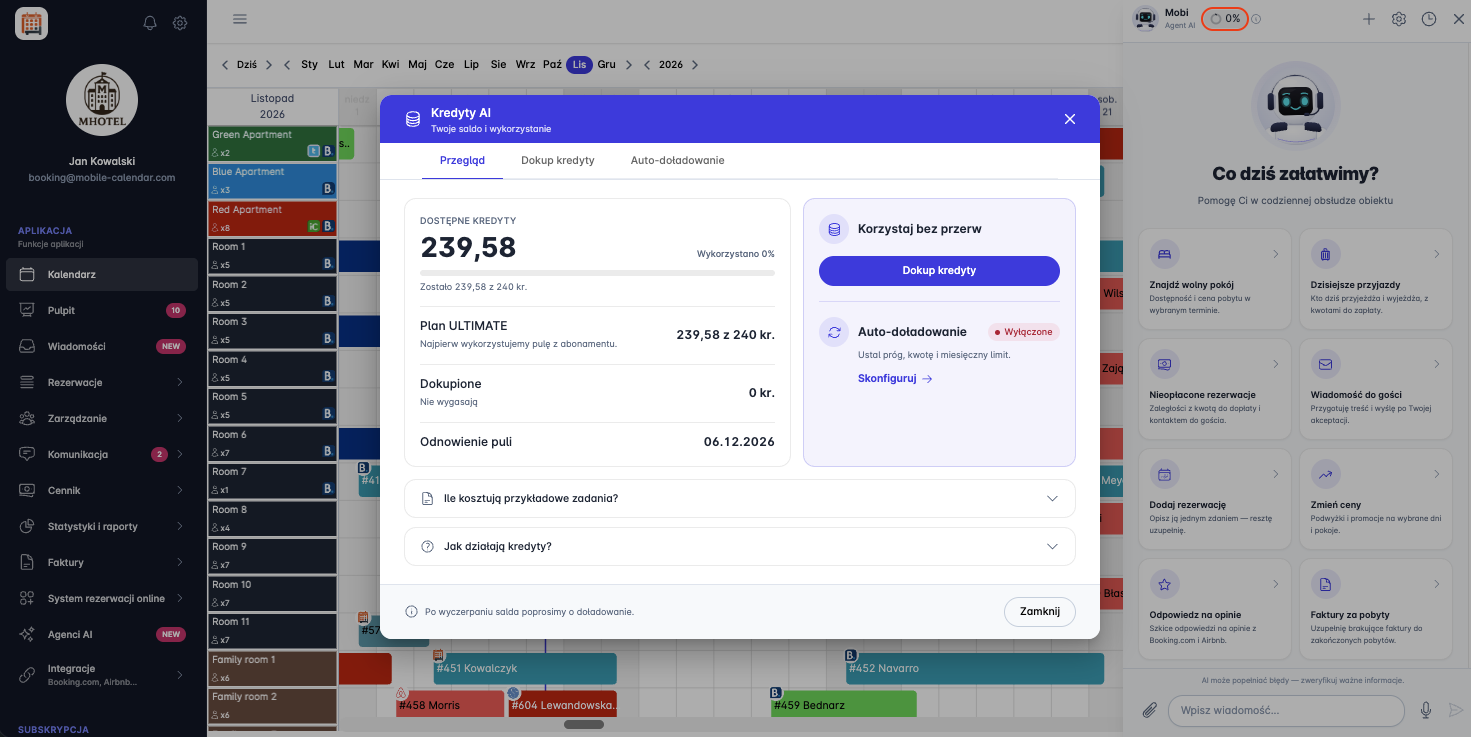
Mobi – checking the AI credit balance and usage The "AI Credits" window will appear. On the Overview tab, you’ll see:
Available credits — how many credits you can still use and the percentage used,
the subscription pool, for example, the ULTIMATE Plan, which contains the credits included in your subscription,
Purchased credits, meaning credits from packages purchased separately,
the Pool renewal date, which is the day your subscription pool renews.
In the "Keep using Mobi without interruption" section, you’ll see the Purchase credits button and the Auto top-up status, for example, Disabled.
Click How much do sample tasks cost? to check how many credits sample tasks use.
Click How do credits work? to expand the explanation of how credits are calculated.
Click the Close button.

Purchasing credits
- In the "AI Credits" window, click the Purchase credits tab.

- In the Currency field, select the currency for your purchase, for example, PLN.
- Compare the packages: each one shows the number of credits, the package price, and the price per credit.
- Click the Purchase button next to the package you want.
Automatic credit top-up
- In the "AI Credits" window, click the Auto top-up tab.

- Turn on the Automatic top-up toggle so credits are added automatically when they start running low.
- In the 1. How top-up works section, set the top-up conditions:
- In the When balance drops below field, enter the credit threshold that will trigger a top-up.
- In the Top-up package field, select a credit package and set the currency in the adjacent dropdown list.
- Check the Charge amount, which is the cost of the selected top-up.
- In the 2. Monthly limit section, choose one of the following options:
- Default limit — on the screen shown, this is 500 PLN per month.
- Custom limit — enter the amount above which credits will not be topped up during that month.
- No limit — top-ups without a monthly limit.
- Check Spent this month to see your spending so far against the limit.
- In the 3. Payment method section, select the payment card for automatic top-ups.
- If you haven’t added a card to the system, add a payment card.
- Click Save to save your settings, or Cancel to discard your changes.
Mobile Application
Introduction
AI credits are units you use to pay for Mobi's work. Each reply from Mobi uses credits. Credits come from the pool included with your Subscription, which renews on a specific day, and from Packages purchased separately.
Instructions
In the bottom menu, go to the AI Agent tab.
In the top-right corner, tap the Credit usage percentage indicator.
The "AI Credits" window will appear. On the Overview tab, you'll see:
available credits, meaning how many credits you can still use,
Subscription credits, meaning credits included with your Subscription,
purchased credits, meaning credits from Packages purchased separately,
pool renewal date, meaning the day your Subscription credits renew.
Was this article helpful?
Ask AI about this article
Choose an assistant. It opens with a ready-made question, reads this article and answers your questions.
Ask AI about this article
Choose an assistant. It opens with a ready-made question, reads this article and answers your questions.