

 Ask AI


Change of reservation dates
Choose an assistant. It opens with a ready-made question, reads this article and answers your questions.
Open in ChatGPT (opens in a new tab) Open in Claude (opens in a new tab) Open in Perplexity (opens in a new tab) Open in Gemini (opens in a new tab) Open in Grok (opens in a new tab) View as MarkdownChoose an assistant. It opens with a ready-made question, reads this article and answers your questions.
Open in ChatGPT (opens in a new tab) Open in Claude (opens in a new tab) Open in Perplexity (opens in a new tab) Open in Gemini (opens in a new tab) Open in Grok (opens in a new tab) View as MarkdownOn this page
On this page
Web Application
Introduction
During an Airbnb reservation, there may be a need to change its terms, e.g., the stay dates, number of guests, room, or price.
A change can be proposed by either the host or the guest. In mobile-calendar, you can send your own change proposal as well as review and respond to a proposal sent by the guest.
Instructions
Change proposal by the host
Click the Airbnb reservation on the Calendar.
In the reservation edit window, click the Airbnb icon to open the reservation details.
Go to the Reservation changes tab.
Click the Propose change button.

- The Propose reservation change window will open.

In the form, you can change:
New check-in and New check-out - select the new stay dates.
Adults, Children, Infants, and Pets - specify the new guest composition.
Move to a different room - select a different room if the reservation should be moved. Available options include rooms from the same Airbnb account.
New total price (optional) - enter the new reservation price. If you leave this field empty, Airbnb will calculate the price based on the rate plan. The cleaning fee and service fee will be added to the entered amount.
After you make changes, the Pricing after change section will display the reservation pricing after taking the proposed changes into account.
Review the pricing, then click Send proposal.
The proposal will be sent to the guest.
Until the guest accepts the proposal, the reservation in the calendar remains unchanged.
Change proposal by the guest
If the guest proposes a reservation change in Airbnb, you will receive a Reservation change request notification in mobile-calendar.
You can open the proposal details in two ways:
- Open the reservation on the Calendar, then in the Reservation change request message click Show details and respond.
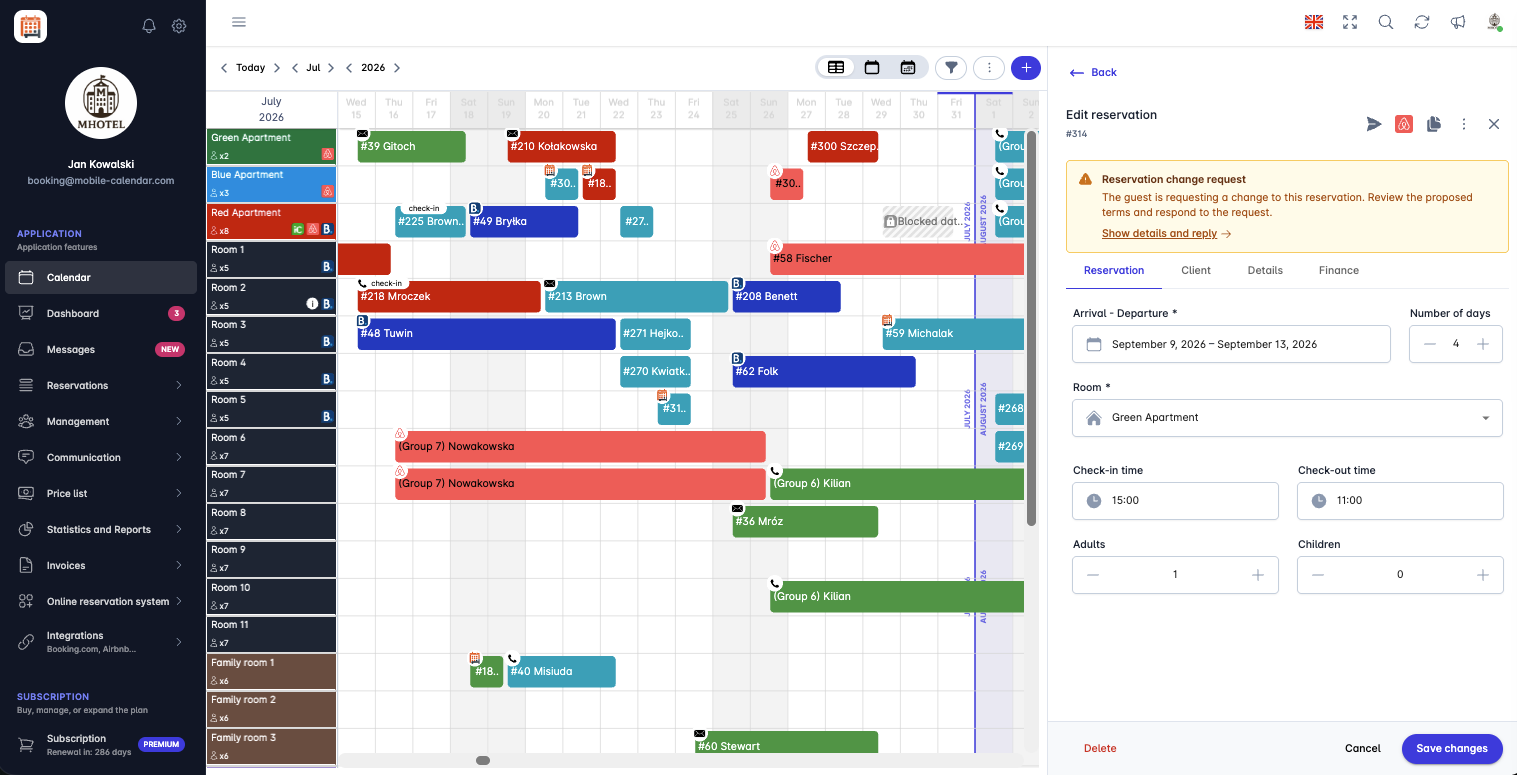
Details of an Airbnb reservation change proposal - Click the Bell icon, then next to the Reservation change request notification click Show details and respond.
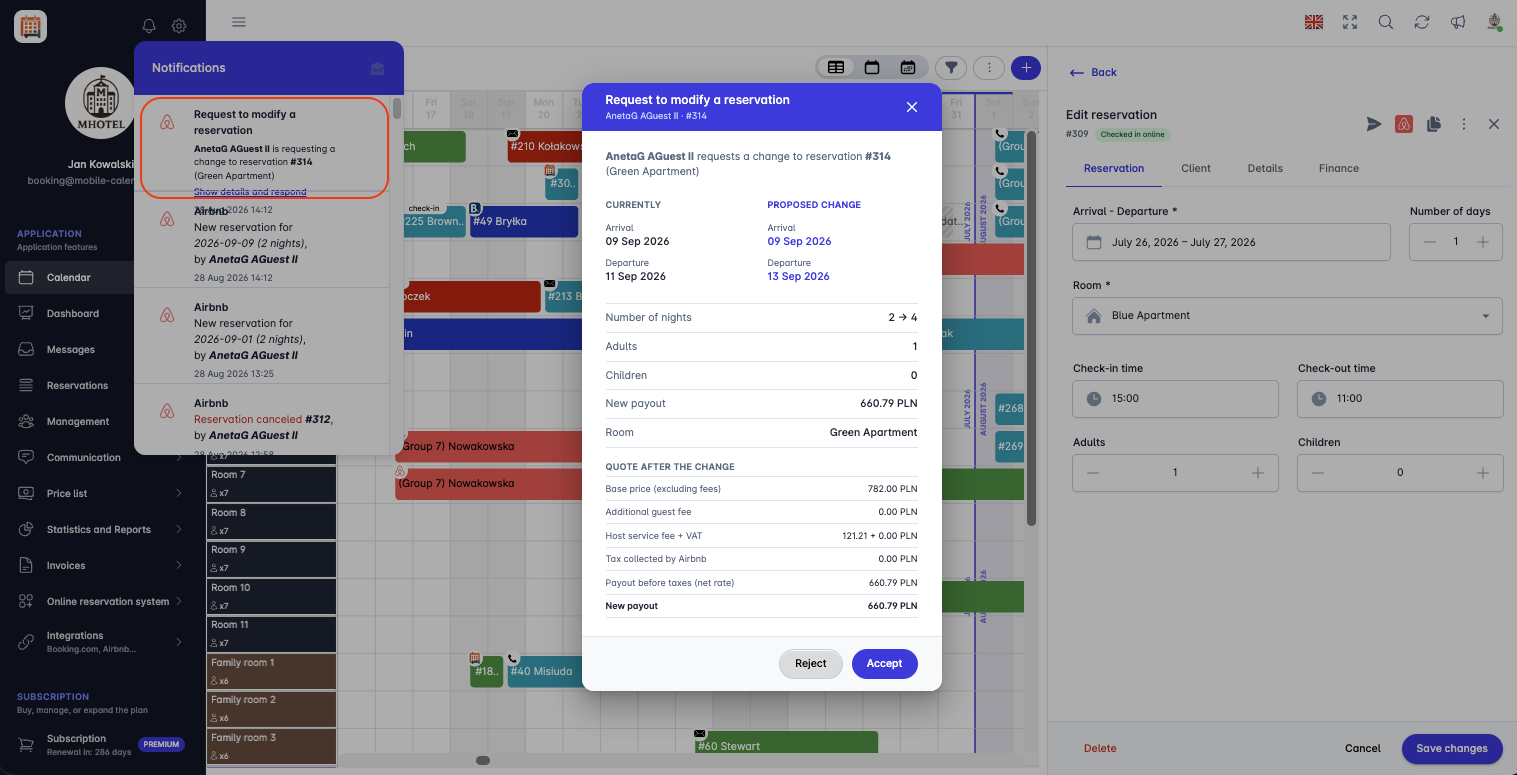
Airbnb reservation change request in the reservation edit window The Reservation change request window will open.
In the window, you can compare the current reservation details with the proposal sent by the guest. The information is presented in the Current and Proposed change columns.
In the proposal details, you will find:
Check-in and Check-out - the current and proposed stay dates.
Number of nights - the current and proposed length of stay.
Adults and Children - the number of guests after the change.
New payout - the payout amount for the host after accepting the change.
Room - the room assigned to the reservation.
In the Pricing after change section, you will find the financial details of the reservation after applying the proposed change, including the base price, fees, taxes, and the new payout.
After reviewing the proposal, choose:
Accept - to accept the change proposed by the guest.
Reject - to reject the proposal and keep the reservation unchanged.


After accepting the change
After the proposal is accepted by the other party, the reservation details will be automatically updated in mobile-calendar.
You do not need to manually update the reservation in the calendar.
Completed change requests can be found in the Reservation changes tab, where you can review the change history and their status.

Mobile Application
Introduction
You can't change Airbnb reservations directly. You can propose new dates, a different number of guests, a new price, or a different room, and the reservation will only change once the guest agrees.
Instructions
Host proposal
In the bottom menu, go to the More tab.
Go to Reservations -> Reservation list.
For a reservation with the Airbnb logo, tap Edit.
Tap the Airbnb icon in the top bar.
In the "Details - Airbnb" window, go to the Booking changes tab and tap Propose a change.

The "Propose a reservation change" form will appear on the screen.
Select the new dates in the New check-in and New check-out fields.
Use the counters for Adults, children, Infants, and Pets to set the guest composition.
You can enter a price in the New total price (optional) field. If you leave it empty, Airbnb will calculate the price from the price list.
In the Move to another room field, you can select a different room from the same Airbnb account.

Wait for the price calculation, then tap Send proposal.
The proposal will be sent to the guest. Until they respond, you can withdraw it using the Withdraw proposal button in the Booking changes tab.
Guest request
If a guest requests a change, you will receive a "Request to modify a reservation" notification. Tap Show details and respond in the notification. You can also find the request in the "Details - Airbnb" window, in the Booking changes tab.
Check the proposed terms and tap Accept or Reject, then confirm your decision. This decision can't be undone.
You can view the request history in the Booking changes tab.
Was this article helpful?
Ask AI about this article
Choose an assistant. It opens with a ready-made question, reads this article and answers your questions.
Ask AI about this article
Choose an assistant. It opens with a ready-made question, reads this article and answers your questions.