

 Ask AI


SMS Gateway Configuration
Choose an assistant. It opens with a ready-made question, reads this article and answers your questions.
Open in ChatGPT (opens in a new tab) Open in Claude (opens in a new tab) Open in Perplexity (opens in a new tab) Open in Gemini (opens in a new tab) Open in Grok (opens in a new tab) View as MarkdownChoose an assistant. It opens with a ready-made question, reads this article and answers your questions.
Open in ChatGPT (opens in a new tab) Open in Claude (opens in a new tab) Open in Perplexity (opens in a new tab) Open in Gemini (opens in a new tab) Open in Grok (opens in a new tab) View as MarkdownOn this page
On this page
Web Application

Introduction
This feature is available on the Professional plan. You can compare plans in the article Which features differ between subscriptions?.
The SMS Gateway is a service that lets you send SMS messages from the system to your guests. You can use the SMS Gateway to send reservation notifications, check-in and check-out reminders, and other information. To use the SMS Gateway, you need to register with SMSAPI and complete a simple configuration in the mobile-calendar system.
Instructions
Registering with SMSAPI.pl
Go to https://www.smsapi.pl/
In the top menu bar, click the Registration button.
Fill in the form.

- In the Business email field, enter your business email address.
- In the Password field, enter a password.
- In the Full name field, enter your first and last name.
- In the Mobile phone number field, enter your phone number.
- Accept the terms and conditions, personal data processing rules, and privacy policy.
- Click the Create free account button.
- Enter the verification code sent to the phone number you provided.
- Log in to the email address you entered in the form and find the message from SMSAPI. In the email, click Activate account.
- Log in using the email address and password you entered in the form.
- To activate your account, fill in your company details.

- Your account will be activated after SMSAPI completes its verification.
Configuring the SMS Gateway in mobile-calendar
In the left-hand menu, click Communication -> SMS Gateway.
Complete the account setup wizard.

In the SMS Gateway field, select smsapi.pl from the dropdown list.
In the API Key field, enter the key.
Where can you find the API key?
- Log in to https://www.smsapi.pl/
- In the left-hand menu, click API Settings -> API Tokens (OAuth).
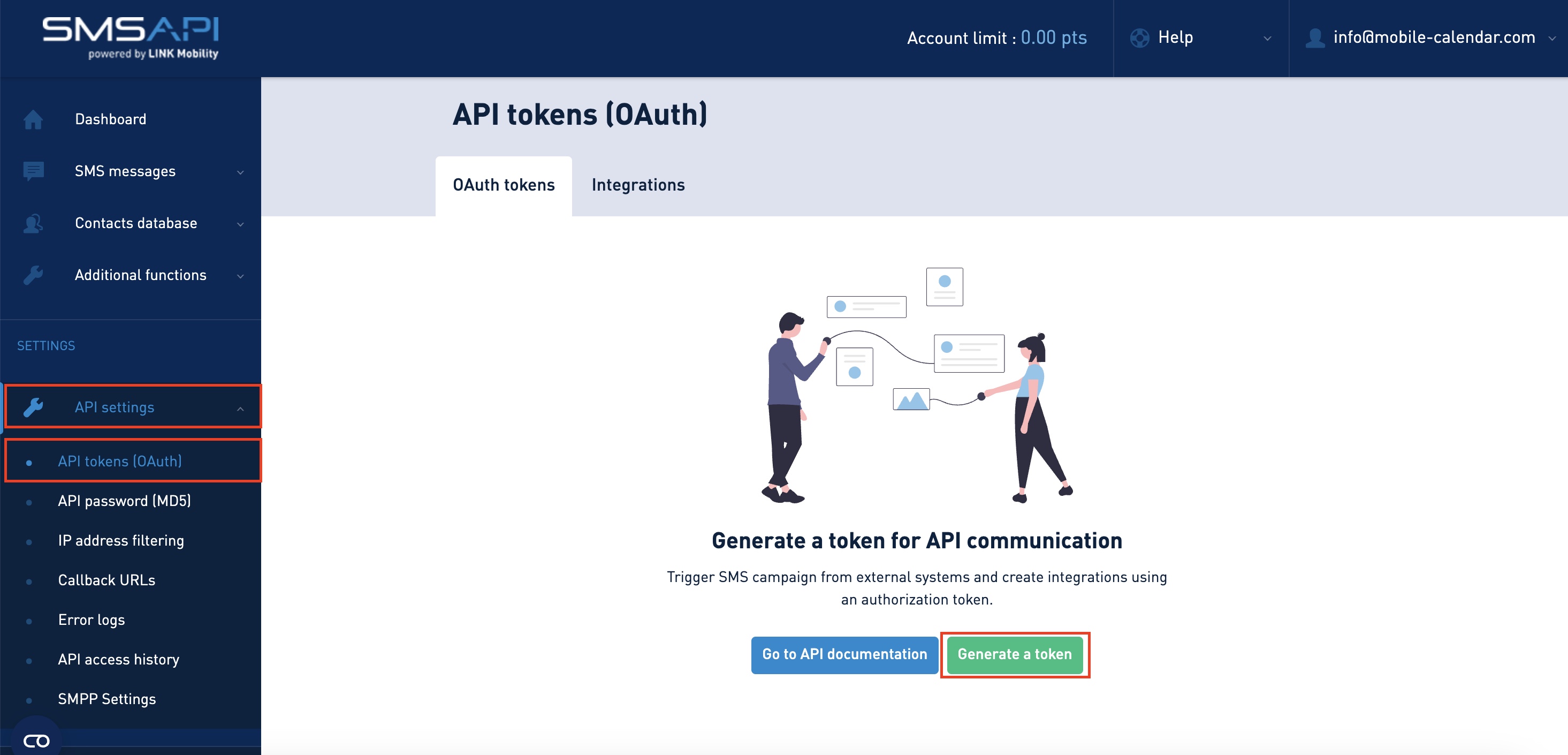
Generating an API key - Click the Generate token button.
- In the Token name field, enter a name.
- For Token expiration date, select Never.
- Select all the checkboxes.
- Click the Generate token button.
- Copy the generated token and paste it into the API Key field in mobile-calendar.
In the Default phone area code field, select an area code from the dropdown list, for example, +48.

Click the Save button.
To check that the SMS Gateway is working, go to the Test message section.

- In the Phone field, select an area code from the dropdown list, then enter the phone number that will receive the test message.
- In the Test message field, enter a test message.
- Click the Send test message button.
- If the message arrives on your phone, the SMS Gateway is configured correctly.
Mobile Application
Introduction
The SMS Gateway lets you send SMS messages to guests from the app. To connect, you need an account with SMSAPI and an API key from its panel.
Instructions
In the bottom menu, go to the More tab.
Go to Communication -> SMS Gateway.
The "SMS Gateway" form will appear on the screen.
In the "Gateway" section, select smsapi.pl or smsapi.com, depending on where you have an account.
Paste the key from the SMSAPI panel (Settings -> API) into the API Key field.
In the "Default country calling code" section, tap the country and select it from the list.
Tap the Save button.

- The configuration will be saved. Send test message will appear on the screen.
Test message
After saving the key, fill in Country calling code, Phone number, and Message content.
Tap the Send button.
Disconnecting the gateway
In the top-right corner, tap the Three-dot menu icon and select Disconnect.
In the confirmation window, tap Yes, delete.
The gateway configuration will be deleted.
Was this article helpful?
Ask AI about this article
Choose an assistant. It opens with a ready-made question, reads this article and answers your questions.
Ask AI about this article
Choose an assistant. It opens with a ready-made question, reads this article and answers your questions.